 实战篇01 02 注视频开头的建立数据库可以直接通过MySQL workbench建立无需考虑基础篇的内容 1.建立数据库 最好使用MySQL workbench执行 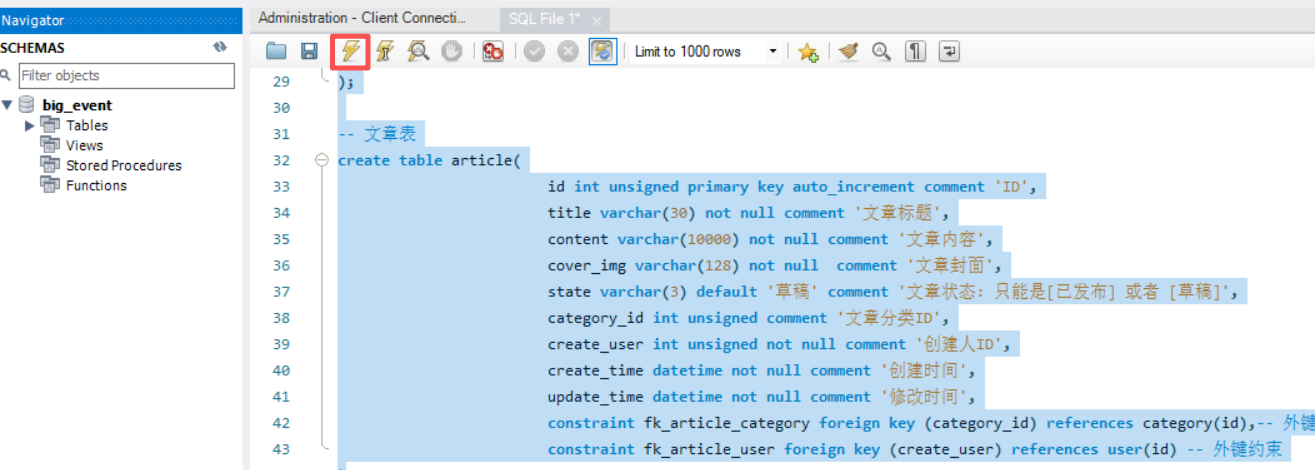SETNAMES utf8mb4;-- 创建数据库createdatabasebig_event;-- 使用数据库usebig_event;-- 用户表createtableuser(idintunsignedprimarykeyauto_incrementcommentID,usernamevarchar(20)notnulluniquecomment用户名,passwordvarchar(32)comment密码,nicknamevarchar(10)defaultcomment昵称,emailvarchar(128)defaultcomment邮箱,user_picvarchar(128)defaultcomment头像,create_timedatetimenotnullcomment创建时间,update_timedatetimenotnullcomment修改时间)comment用户表;-- 分类表createtablecategory(idintunsignedprimarykeyauto_incrementcommentID,category_namevarchar(32)notnullcomment分类名称,category_aliasvarchar(32)notnullcomment分类别名,create_userintunsignednotnullcomment创建人ID,create_timedatetimenotnullcomment创建时间,update_timedatetimenotnullcomment修改时间,constraintfk_category_userforeignkey(create_user)referencesuser(id)-- 外键约束);-- 文章表createtablearticle(idintunsignedprimarykeyauto_incrementcommentID,titlevarchar(30)notnullcomment文章标题,contentvarchar(10000)notnullcomment文章内容,cover_imgvarchar(128)notnullcomment文章封面,statevarchar(3)default草稿comment文章状态: 只能是[已发布] 或者 [草稿],category_idintunsignedcomment文章分类ID,create_userintunsignednotnullcomment创建人ID,create_timedatetimenotnullcomment创建时间,update_timedatetimenotnullcomment修改时间,constraintfk_article_categoryforeignkey(category_id)referencescategory(id),-- 外键约束constraintfk_article_userforeignkey(create_user)referencesuser(id)-- 外键约束)以上内容在项目内的DB Navigator看的这是因为原教程在做这件事的时候并没有关闭之前的项目实际上可以放在新建项目后查看2.新建项目新项目不完整在main下新建resources目录双击resrouces即可在resources下新建文件application.yml3.修改pom文件parentparentgroupIdorg.springframework.boot/groupIdartifactIdspring-boot-starter-parent/artifactIdversion3.1.3/version/parentdependenciesdependencygroupIdorg.springframework.boot/groupIdartifactIdspring-boot-starter-web/artifactId/dependency!--mybatis依赖--dependencygroupIdorg.mybatis.spring.boot/groupIdartifactIdmybatis-spring-boot/artifactIdversion3.0.0/version/dependency!--MySQL驱动依赖--dependencygroupIdcom.mysql/groupIdartifactIdmysql-connector-j/artifactId/dependency刷新maven3.配置信息在Application.yml中spring:datasource:driver-class-name:com.mysql.cj.jdbc.Driverurl:jdbc:mysql://localhost:3306/big_eventuser:***password:***4.创建包结构与实体类在APP所在目录下创建包controller、mapper、service、service\iml、pojo(实体类)、utils工具类将资料中的02资料\04_综合案例资料\02_后台资料\03_实体类下的实体类user、article、category导入–对应数据库中的三张表用来封装从数据库中取出的数据复制后再ideal的pojo中粘贴5.修改启动类对APP重命名启动类名字工程名Application大驼峰添加注解SpringBootApplication以及固定的函数SpringApplication.run(启动类.classmain函数的参数SpringBootApplicationpublicclassBigEventApplication{publicstaticvoidmain(String[]args){System.out.println(Hello World!);SpringApplication.run(BigEventApplication.class,args);}}Tomcat完成启动
实战篇01 02 注视频开头的建立数据库可以直接通过MySQL workbench建立无需考虑基础篇的内容 1.建立数据库 最好使用MySQL workbench执行 SETNAMES utf8mb4;-- 创建数据库createdatabasebig_event;-- 使用数据库usebig_event;-- 用户表createtableuser(idintunsignedprimarykeyauto_incrementcommentID,usernamevarchar(20)notnulluniquecomment用户名,passwordvarchar(32)comment密码,nicknamevarchar(10)defaultcomment昵称,emailvarchar(128)defaultcomment邮箱,user_picvarchar(128)defaultcomment头像,create_timedatetimenotnullcomment创建时间,update_timedatetimenotnullcomment修改时间)comment用户表;-- 分类表createtablecategory(idintunsignedprimarykeyauto_incrementcommentID,category_namevarchar(32)notnullcomment分类名称,category_aliasvarchar(32)notnullcomment分类别名,create_userintunsignednotnullcomment创建人ID,create_timedatetimenotnullcomment创建时间,update_timedatetimenotnullcomment修改时间,constraintfk_category_userforeignkey(create_user)referencesuser(id)-- 外键约束);-- 文章表createtablearticle(idintunsignedprimarykeyauto_incrementcommentID,titlevarchar(30)notnullcomment文章标题,contentvarchar(10000)notnullcomment文章内容,cover_imgvarchar(128)notnullcomment文章封面,statevarchar(3)default草稿comment文章状态: 只能是[已发布] 或者 [草稿],category_idintunsignedcomment文章分类ID,create_userintunsignednotnullcomment创建人ID,create_timedatetimenotnullcomment创建时间,update_timedatetimenotnullcomment修改时间,constraintfk_article_categoryforeignkey(category_id)referencescategory(id),-- 外键约束constraintfk_article_userforeignkey(create_user)referencesuser(id)-- 外键约束)以上内容在项目内的DB Navigator看的这是因为原教程在做这件事的时候并没有关闭之前的项目实际上可以放在新建项目后查看2.新建项目新项目不完整在main下新建resources目录双击resrouces即可在resources下新建文件application.yml3.修改pom文件parentparentgroupIdorg.springframework.boot/groupIdartifactIdspring-boot-starter-parent/artifactIdversion3.1.3/version/parentdependenciesdependencygroupIdorg.springframework.boot/groupIdartifactIdspring-boot-starter-web/artifactId/dependency!--mybatis依赖--dependencygroupIdorg.mybatis.spring.boot/groupIdartifactIdmybatis-spring-boot/artifactIdversion3.0.0/version/dependency!--MySQL驱动依赖--dependencygroupIdcom.mysql/groupIdartifactIdmysql-connector-j/artifactId/dependency刷新maven3.配置信息在Application.yml中spring:datasource:driver-class-name:com.mysql.cj.jdbc.Driverurl:jdbc:mysql://localhost:3306/big_eventuser:***password:***4.创建包结构与实体类在APP所在目录下创建包controller、mapper、service、service\iml、pojo(实体类)、utils工具类将资料中的02资料\04_综合案例资料\02_后台资料\03_实体类下的实体类user、article、category导入–对应数据库中的三张表用来封装从数据库中取出的数据复制后再ideal的pojo中粘贴5.修改启动类对APP重命名启动类名字工程名Application大驼峰添加注解SpringBootApplication以及固定的函数SpringApplication.run(启动类.classmain函数的参数SpringBootApplicationpublicclassBigEventApplication{publicstaticvoidmain(String[]args){System.out.println(Hello World!);SpringApplication.run(BigEventApplication.class,args);}}Tomcat完成启动
黑马SpringBoot3+Vue3(实战篇)学习记录 一:新建数据库、新建项目
发布时间:2026/5/18 22:18:19
实战篇01 02 注视频开头的建立数据库可以直接通过MySQL workbench建立无需考虑基础篇的内容 1.建立数据库 最好使用MySQL workbench执行 SETNAMES utf8mb4;-- 创建数据库createdatabasebig_event;-- 使用数据库usebig_event;-- 用户表createtableuser(idintunsignedprimarykeyauto_incrementcommentID,usernamevarchar(20)notnulluniquecomment用户名,passwordvarchar(32)comment密码,nicknamevarchar(10)defaultcomment昵称,emailvarchar(128)defaultcomment邮箱,user_picvarchar(128)defaultcomment头像,create_timedatetimenotnullcomment创建时间,update_timedatetimenotnullcomment修改时间)comment用户表;-- 分类表createtablecategory(idintunsignedprimarykeyauto_incrementcommentID,category_namevarchar(32)notnullcomment分类名称,category_aliasvarchar(32)notnullcomment分类别名,create_userintunsignednotnullcomment创建人ID,create_timedatetimenotnullcomment创建时间,update_timedatetimenotnullcomment修改时间,constraintfk_category_userforeignkey(create_user)referencesuser(id)-- 外键约束);-- 文章表createtablearticle(idintunsignedprimarykeyauto_incrementcommentID,titlevarchar(30)notnullcomment文章标题,contentvarchar(10000)notnullcomment文章内容,cover_imgvarchar(128)notnullcomment文章封面,statevarchar(3)default草稿comment文章状态: 只能是[已发布] 或者 [草稿],category_idintunsignedcomment文章分类ID,create_userintunsignednotnullcomment创建人ID,create_timedatetimenotnullcomment创建时间,update_timedatetimenotnullcomment修改时间,constraintfk_article_categoryforeignkey(category_id)referencescategory(id),-- 外键约束constraintfk_article_userforeignkey(create_user)referencesuser(id)-- 外键约束)以上内容在项目内的DB Navigator看的这是因为原教程在做这件事的时候并没有关闭之前的项目实际上可以放在新建项目后查看2.新建项目新项目不完整在main下新建resources目录双击resrouces即可在resources下新建文件application.yml3.修改pom文件parentparentgroupIdorg.springframework.boot/groupIdartifactIdspring-boot-starter-parent/artifactIdversion3.1.3/version/parentdependenciesdependencygroupIdorg.springframework.boot/groupIdartifactIdspring-boot-starter-web/artifactId/dependency!--mybatis依赖--dependencygroupIdorg.mybatis.spring.boot/groupIdartifactIdmybatis-spring-boot/artifactIdversion3.0.0/version/dependency!--MySQL驱动依赖--dependencygroupIdcom.mysql/groupIdartifactIdmysql-connector-j/artifactId/dependency刷新maven3.配置信息在Application.yml中spring:datasource:driver-class-name:com.mysql.cj.jdbc.Driverurl:jdbc:mysql://localhost:3306/big_eventuser:***password:***4.创建包结构与实体类在APP所在目录下创建包controller、mapper、service、service\iml、pojo(实体类)、utils工具类将资料中的02资料\04_综合案例资料\02_后台资料\03_实体类下的实体类user、article、category导入–对应数据库中的三张表用来封装从数据库中取出的数据复制后再ideal的pojo中粘贴5.修改启动类对APP重命名启动类名字工程名Application大驼峰添加注解SpringBootApplication以及固定的函数SpringApplication.run(启动类.classmain函数的参数SpringBootApplicationpublicclassBigEventApplication{publicstaticvoidmain(String[]args){System.out.println(Hello World!);SpringApplication.run(BigEventApplication.class,args);}}Tomcat完成启动
相关文章

Windows右键菜单终极清理指南:三步高效管理冗余选项
Windows右键菜单终极清理指南:三步高效管理冗余选项 【免费下载链接】ContextMenuManager 🖱️ 纯粹的Windows右键菜单管理程序 项目地址: https://gitcode.com/gh_mirrors/co/ContextMenuManager Windows右键菜单随着软件安装日益臃肿࿰…
长期使用Taotoken服务在延迟与可用性方面的主观回顾
🚀 告别海外账号与网络限制!稳定直连全球优质大模型,限时半价接入中。 👉 点击领取海量免费额度 长期使用Taotoken服务在延迟与可用性方面的主观回顾 1. 引言 在近一年的项目开发与维护周期中,我们团队持续将Taotoke…
避坑指南:STM32F407的ADC多通道采样,你的数据顺序真的对了吗?
STM32F407多通道ADC采样数据错位排查手册 在嵌入式开发中,ADC多通道采样是常见需求,但数据顺序错乱问题却让不少工程师深夜加班。上周有位同行发来求助:他的四通道温度监测系统运行两周后,突然出现通道数据交叉污染,导…

React开发工具大全:终极指南和必备资源清单
React开发工具大全:终极指南和必备资源清单 【免费下载链接】react-faq A collection of links to help answer your questions about React.js 项目地址: https://gitcode.com/gh_mirrors/re/react-faq React开发工具是每个React开发者提升工作效率和项目质…
后端性能优化:GitHub_Trending/boo/books的数据库调优书籍
后端性能优化:GitHub_Trending/boo/books的数据库调优书籍 你是否还在为数据库查询缓慢而烦恼?是否想提升后端系统的响应速度但不知从何入手?本文将带你探索GitHub_Trending/boo/books项目中与数据库调优相关的精选书籍,帮助你系…
基于LLM与Mermaid的智能图表生成:从自然语言到架构图
1. 项目概述:当自然语言遇上架构图最近在技术社区里,一个名为fraserxu/diagram-gpt的项目引起了我的注意。作为一名经常需要画技术架构图、流程图来沟通设计思路的开发者,我深知这个过程有多“磨人”。你需要在各种绘图工具(比如 …
RK3588/RK1820嵌入式AI模型选型与部署实战:9大模型场景化应用指南
1. 项目概述:嵌入式AI模型部署的十字路口作为一名在嵌入式AI领域摸爬滚打了十多年的老兵,我见过太多项目在模型部署这个环节上栽跟头。大家手里可能都握着RK3588、RK182X这类性能强悍的瑞芯微平台,硬件算力摆在那里,但真要把一个A…
Namshi/JOSE核心组件解析:JWT、JWS与SimpleJWS的区别与联系
Namshi/JOSE核心组件解析:JWT、JWS与SimpleJWS的区别与联系 【免费下载链接】jose JSON Object Signing and Encryption library for PHP. 项目地址: https://gitcode.com/gh_mirrors/jos/jose Namshi/JOSE是一个功能强大的PHP JSON对象签名与加密库…
Linux Exploit Suggester与常见漏洞检测工具对比分析:终极指南
Linux Exploit Suggester与常见漏洞检测工具对比分析:终极指南 【免费下载链接】Linux_Exploit_Suggester Linux Exploit Suggester; based on operating system release number 项目地址: https://gitcode.com/gh_mirrors/li/Linux_Exploit_Suggester Linu…

精益管理推不动?找准根源+避坑指南,破解全员参与难题
很多工厂推行精益管理,都陷入了管理层热、员工冷的尴尬困境:管理层耗费大量精力制定精益方案、投入资源,却始终推不动,一线员工要么被动应付,要么抵触反抗,不主动识别浪费、不参与改善,精益落地…
基于React与Zustand构建现代化个人站点导航器:从设计到部署全解析
1. 项目概述:一个现代站点导航器的诞生最近在整理自己的浏览器书签和常用工具时,我发现自己陷入了一个典型的“数字混乱”状态。收藏夹里塞满了各种链接,从开发文档、设计资源到日常工具,杂乱无章。每次想找一个特定的网站&#x…
开发团队如何通过 Taotoken 实现 API 密钥的统一管理与审计
🚀 告别海外账号与网络限制!稳定直连全球优质大模型,限时半价接入中。 👉 点击领取海量免费额度 开发团队如何通过 Taotoken 实现 API 密钥的统一管理与审计 对于开发团队而言,安全、高效地管理大模型 API 密钥是一项…

【实用小程序】超轻量级文件上传下载中心 (File Download Server)
站内源码及jar包下载 一、项目概述 文件下载中心一个基于 Java 内置 HTTP 服务器(com.sun.net.httpserver)构建的轻量级文件管理服务。它零第三方依赖,单 JAR 包即可运行,适合在内网环境或临时场景中快速搭建文件共享站点。 你的团队需要临时共享一批日志文件或交付物,…
py每日spider案例之某website之xin东方选课搜索接口(难度一般 扣取代码即可)
加密位置: 逆向接口参数: 逆向接口: const g = globalThis; g.window = g; g.self = g; g.location = {<
终极轻量级Android文本编辑器Markor:多格式笔记应用完全指南
终极轻量级Android文本编辑器Markor:多格式笔记应用完全指南 【免费下载链接】markor Text editor - Notes & ToDo (for Android) - Markdown, todo.txt, plaintext, math, .. 项目地址: https://gitcode.com/gh_mirrors/ma/markor 在移动设备上寻找一款…

MPC-BE:基于DirectShow架构的专业级开源媒体播放解决方案
MPC-BE:基于DirectShow架构的专业级开源媒体播放解决方案 【免费下载链接】MPC-BE MPC-BE – универсальный проигрыватель аудио и видеофайлов для операционной системы Windows. 项目地址:…
如何快速计算3D模型体积和重量:STL-Volume-Model-Calculator终极指南
如何快速计算3D模型体积和重量:STL-Volume-Model-Calculator终极指南 【免费下载链接】STL-Volume-Model-Calculator STL Volume Model Calculator Python 项目地址: https://gitcode.com/gh_mirrors/st/STL-Volume-Model-Calculator 你是否曾经为3D打印项目…
通过Taotoken CLI工具一键配置团队开发环境与模型密钥
通过Taotoken CLI工具一键配置团队开发环境与模型密钥 1. CLI工具安装与基本使用 Taotoken提供的CLI工具可通过npm全局安装或直接使用npx运行。对于需要频繁使用CLI的团队,推荐全局安装: npm install -g taotoken/taotoken对于临时使用或项目级配置&a…